• How Many Pixels Do You Need?

    House in Beverly Heights, Mount Lebanon, Pennsylvania
    A picture of a house in Mount Lebanon, an inner suburb of Pittsburgh. Enlarge it and admire the sharp detail. It was taken with a Canon PowerShot S45, a camera advertised as having 4-megapixel resolution, which is rounding up from about 3.9.

    Father Pitt often brings out cameras from the Neolithic era of digital photography, when digital cameras had settled down in large communities but had not yet learned to smelt bronze. Why? Well, there are several reasons, and some day old Pa Pitt will devote an article to them. To summarize:

    1. Pocket cameras of this era often allow more manual control than later cameras.

    2. Older cameras can be found very cheap in thrift stores and online auctions—often for less than the price of a paperback book.

    3. Therefore, if you lose one on an expedition, you can just buy another one.

    4. And therefore, you can have a wide range of cameras, which is a good thing because every camera is a different way of seeing the world. Any photographer will tell you that, when you pick up a different camera, different pictures happen.

    But one thing these cameras obviously lack is the resolution of more modern cameras. As a rough guide, what Father Pitt thinks of as the “Neolithic era” of digital photography was the period when digital cameras had resolutions from two to five megapixels.

    Is that enough? Well, as old Pa Pitt has pointed out, the very finicky magazine National Geographic decided that digital cameras were good enough for its pages when they reached five megapixels.

    But that was almost a quarter-century ago. How about for today’s uses?

    For most purposes today, the resolution requirements are even less. Last month, Marc R. at Open Source Photography published an article on exactly this question: “The Pixel Paradox.”

    One thing professional photographers worry about is other people stealing their work, which Father Pitt has not worried about in a long time. People use his pictures all the time, with his blessing, because he has a notice on his site that says “Steal my work.” All his pictures are released under a CC0 public-domain donation, so anyone can do anything with them without permission. So Father Pitt isn’t interested in how to balance size with the possibility of theft, which is one of the questions Marc R. addresses.

    But his practical answers are interesting. He gives us a table with the recommended maximum number of pixels for the longest dimension of a photograph for various purposes. The longest recommended dimension, for any online use including photo contests, is 2048 pixels.

    Now look at the picture at the head of this article, which was taken with a 2002-vintage Canon camera. Its 3.9-megapixel resolution means that its pictures are 2272 pixels on the long side. You would have to crop or shrink those pictures to fit them in any of Marc R.’s recommended sizes.

    So a camera that is nearly a quarter-century old is more than adequate, in terms of resolution, for any use in which the pictures will be published on line.

    As for other considerations, you would have a hard time finding a camera as good as the Canon that fits in your coat pocket the way the Canon does. It has manual control of everything, it can save raw picture data, it has an excellent lens for such a small camera, and it’s built like a tank.

    All other things being equal, it’s always better to have more pixels to work with. But all other things are never equal. If you find an old camera like the Canon PowerShot S45 in a thrift store, pick it up and bring it home. Spend a few more dollars on extra batteries and a 2-gigabyte Compact Flash card (no bigger, because the camera can’t read a bigger card), and you have a picture-taking machine that slips into a coat pocket but gives you admirable results. And don’t worry at all about the low resolution. You’ve got all the pixels you need for most purposes.

  • Two-Color Photography

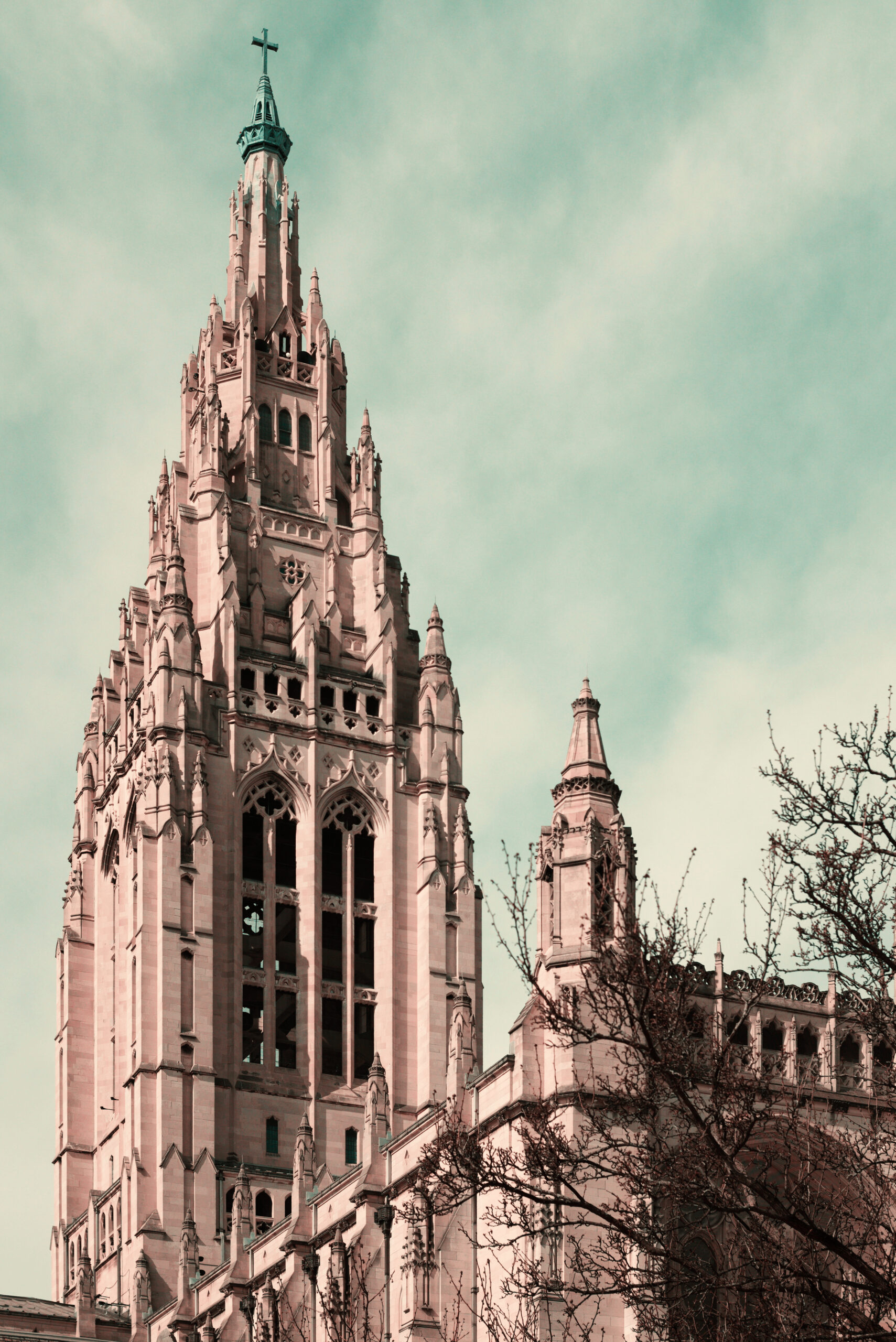
    Tower of East Liberty Presbyterian Church
    Tower of East Liberty Presbyterian Church, Pittsburgh, in old-postcard colors. Sony Alpha 3000 with 7Artisans f/1.4 35mm lens.

    It used to be common to see colored pictures printed in two colors rather than the three it takes to create full natural colors. That was because it was cheaper and easier, of course, but it also gave old postcards and other colored pictures a distinctive look that was attractive in its own way. The first Technicolor movies were made with two colors as well, until three-colored Technicolor was finally introduced in 1935 (Disney had it in 1932, but under a three-year exclusive contract). Years ago some clever photographer made a script for the GIMP that simulated the look of two-strip Technicolor, and Father Pitt enjoyed playing with it and made a whole site called “Two-Color World” to display the results. But the GIMP has moved on, and the old script has not; it no longer works with the latest version of the software. The series of steps it automated was complex and time-consuming, and old Pa Pitt is not patient enough to learn the scripting languages that the GIMP understands.

    However, Father Pitt recently discovered another way to get the same effect in an unlikely place. G’MIC—a huge assortment of miscellaneous image-processing tools that can be used by itself or as a plugin for the GIMP, Affinity, or Photoshop—has a tool for simulating colorblindness. It is very useful in judging the accessibility of a Web site, for example, because it will show you whether people with various kinds of colorblindness can distinguish important details.

    One of the rare kinds of colorblindness is tritanopia, in which the sense of blue and yellow does not function—precisely the colors that cannot be rendered by two-strip Technicolor or the usual two-color printing. In effect, people with tritanopia see the world in two-strip Technicolor.

    Find the “Color Blindness” filter in G’MIC, choose “Tritanopia” from the drop-down menu, and you have an old-fashioned two-color photograph, suitable for a 1900 postcard.

    To simulate the exact look of old postcards or movies, including the aging medium (the paper or film stock), it may be helpful to raise the color temperature after applying the filter.

    Four Gateway Center
    Four Gateway Center, Pittsburgh. Fujifilm FinePix HS10.

  • Quirks of the Nikon COOLPIX P100

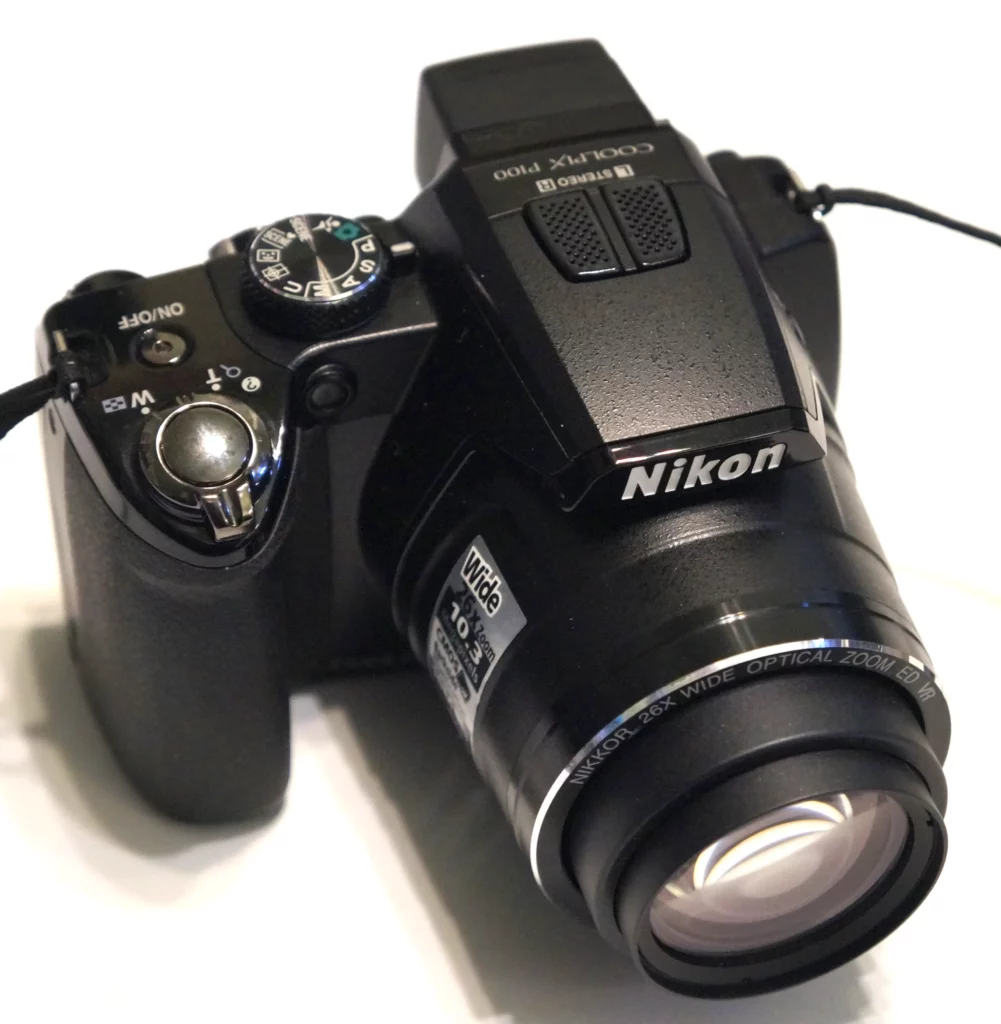
    Nikon COOLPIX P100

    This was a pretty good superzoom fifteen years ago, and it still can produce good pictures. It takes more effort to get those good pictures than with most of old Pa Pitt’s other outdated cameras, though, and sometimes he wonders whether the results are worth putting up with its eccentricities.

    First, this camera takes a proprietary battery. Almost all cameras these days do. Camera manufacturers were shamed out of using AA batteries by online rants, but all the online rants Father Pitt has read against AA batteries in cameras start from the same premise: rechargeable AA batteries do not exist. Father Pitt does not know how that incorrect assumption became accepted dogma in the photography world. With good AA batteries, the number of pictures per charge is comparable to what proprietary batteries can do, and the advantage of having one kind of battery for every camera becomes more obvious the more cameras you have. Father Pitt has a lot of cameras, so he tries to look for cameras that use AA batteries. But this camera came at a very low price, so it was worth trying out.

    A more serious difficulty is that the separate battery that runs the clock and keeps the settings is defunct, and it cannot be replaced. With most cameras, this means the minor inconvenience of having to reset the date and time with every battery change. With this camera, though, all settings are reset to defaults with every battery change. That would not be a problem if the default settings were reasonable, but they’re rubbish.

    First of all, this is the only camera Father Pitt owns that does not default to its highest-quality image setting. Fine, Normal, and Basic are the three settings available, and the camera defaults to the middle one. At the “Fine” setting, the camera can store more than six thousand pictures on a 32-gigabyte card, so there’s no good reason to skimp on quality.

    Next is the “AF area mode.” At the default “Auto” setting, the camera hunts around for things to focus on and picks a different one each time, usually the wrong one. Setting the mode to “Center” makes autofocus work reliably.

    Then comes “Distortion control.” Like most superzooms, this one trades a fair amount of lens distortion for its long zoom range. You can set the camera to correct that distortion—but the setting is off by default.

    And here we run into one of the other odd quirks of this camera, which is that you can’t have distortion correction and exposure bracketing, or a number of other things. You must choose one or the other. The manual has a two-page chart, in small print, of “functions that cannot be applied simultaneously”—and it leaves out a lot of things, which you can only find out by experiment. For example, it doesn’t tell you that you can’t use distortion control with auto bracketing.

    Next on our list of bad defaults, we go to the “Optimize image” submenu. Here we ignore the second level of options and pick “Custom,” which allows us to adjust the contrast, sharpening, and saturation, all of which are much too aggressive by default. Father Pitt sets them all to the lowest levels.

    Because the settings are lost every time the battery is changed, this routine has to be repeated every time the battery is changed. To be fair to the camera, it was not designed to lose the settings; they were meant to be kept by the clock battery. But it is also fair to point out that the clock battery was designed not to be replaceable, and online chatter indicates that it failed early in a large number of these cameras. And it is also fair to point out that other cameras do not lose settings when they lose the date and time; other manufacturers found a way to store those settings in nonvolatile memory.

    Finally, one other annoyance: the camera is not smart enough to take the zoom into account when using Auto ISO mode, and the image stabilization is unimpressive. To get a sharp picture at the long end of the zoom, it’s necessary to set a higher ISO speed by hand, and then remember to set it back after retracting the zoom.

    All right, but what about the pictures?

    Well, they’re kind of lousy at the default settings, but once the settings are tweaked, they’re very good for a superzoom. The camera will not save in raw format, but the CMOS sensor compensates for that somewhat. Father Pitt likes to use exposure bracketing, and the three exposures are taken quickly, with the camera ready for another three in a second or two. These bracketed exposures can be made into HDR pictures that preserve a high level of detail in shadows and highlights.

    So, for the shopper looking for a cheap used camera, is the P100 worth it?

    If you have a choice (and that’s what online auctions are for), old Pa Pitt would recommend something else. His Fujifilm FinePix HS10, for example, has the same resolution and came out at the same time, but it is far better at everything it does, and it has more capabilities, including saving in raw format. Also, its internal clock still works.

    But if you see one of these Nikons in a flea market for $5, well, you can get some very good pictures out of it.

    A few pictures taken with the Nikon:

    Highland Towers, Shadyside

    Highland Towers, Shadyside.

    Lonicera periclymenum

    Lonicera periclymenum.

    St. Peter’s Church, North Side

    St. Peter’s Church, North Side.

    Lut’s Meat Market

    Lutz’s Meat Market, Hill District. This is one of those HDR pictures made from three bracketed exposures. The speed of bracketed exposures is one of this camera’s chief recommendations.


  • Easy to Use

    A pocket digital camera was sitting around, and Father Pitt picked it up to see whether it might be worth using. Here are the Modes:

    Scene Recognition Auto

    Auto

    Program

    Natural & Flash

    Natural Light

    Portrait

    Baby Mode

    Smile & Shoot

    Landscape

    Panorama

    Sport

    Night

    Night (Tripod)

    Fireworks

    Sunset

    Snow

    Beach

    Party

    Flower

    Text

    But you can’t control shutter speed, aperture, or focus, because that would be too hard to figure out.


  • Moving Water

    Fountain at Gateway Center
    Fountain at Gateway Center. Notice the fascinating patterns in the falling water.

    Old Pa Pitt would like to have a little electronic device, like a TV remote, that could turn off clichés. Just push the button, and the cliché disappears from our intellectual landscape. And the first photographic cliché he would turn off would be the moving-water cliché.

    Try it yourself. Look up guides for beginning photographers who want to move on to the next level of manual control. When they come to the question of shutter speeds, what is the example they give to illustrate why you might want to control the shutter speed yourself? Four out of five of them tell you that you’ll want to do that to blur moving water.

    Why? Why is moving water supposed to be blurred? Why should it look like strings of cotton candy? It’s unnatural. The only place that effect belongs is on inspirational posters with quotations from C-list poets.

    But it has become a cliché. More than that: it’s a dogma. You have to blur moving water. It’s your duty as a responsible photographer to smooth out rapids and waterfalls into white streaks.

    Why? You don’t see moving water that way when you look at it. You see an irregular surface, constantly changing, and the thing that is most characteristic is its chaotic irregularity. This characteristic is exactly what is removed by deliberately slowing the shutter speed to turn the water into a white streak.

    But we can admit to ourselves that it produces some pictures that attract attention. At least they do the first five or six times you see the effect. After that you begin to get a bit tired of it, don’t you? By “tired” Father Pitt means that you simply don’t notice those pictures anymore. If you are forced to pay attention to them, you may tell the photographer that they are very nice, and the word you would use to describe them is restful. In fact they are a perfect cure for insomnia, especially if they are adorned with quotations from C-list poets.

    So what should we substitute for this cliché? We can’t just take regular pictures of moving water, can we?

    Well, yes we can. In fact, to counteract the cliché, it might be good to use the fastest shutter speed possible for moving water. You’ll capture drops suspended in the air, wavelets in the act of breaking, and other fascinating things that will actually give people something to look at, as opposed to a smooth and undifferentiated white streak.

    In fact you’d probably get better results by leaving your camera on full auto mode and snapping your picture than by deliberately slowing down your shutter to achieve the effect that the textbook says you should use, the effect that will put every viewer to sleep.

    Of course, the other great thing to do with moving water is to take movies. Water in motion is an endlessly fascinating subject for the kind of videos that most digital cameras or smartphones can do very well; and since most pictures are seen on screen these days anyway, there’s no reason they shouldn’t move.

    But don’t slow down your shutter to blur moving water. If you feel tempted, try some other cliché, like extreme wide angles. Someday soon Father Pitt will tell you how much he hates those.


    Comments